Von 12. bis zum 13 März 2019 verwandelt sich das Münchner Messegelände wieder in das Zentrum von E-Commerce und der Internet-Professionals. Auf der E-Commerce Messe Internet World Expo werden die neusten Trends präsentiert, die aktuellsten Technologien vorgestellt, namhafte Aussteller stellen ihre neuesten Produkte oder Dienstleistungen vor und zahlreiche renommierte Experten geben in Vorträgen ihr Wissen weiter.
Internet World Expo 2019: Große Anzahl an Aussteller und Fachvorträgen
Seit dem Jahr 1997 zeigt die Internet World Expo, was der Handel – sowohl online als auch stationär – in Zukunft mit sich bringen wird, welche Herausforderungen und welche Änderungen bevorstehen. Mehr als 450 Aussteller präsentieren aktuelle Schwerpunkte aus den Bereichen E-Commerce, Online Marketing, Multichannel, E-Payment. Ein Rahmenprogramm bietet Fachvorträge, in der Trendarena bestimmen technische Attraktionen das Angebot und auf Sonderflächen werden Trendthemen wie POS connect, Amazon World oder CMCX – Content Marketing Conference & Expo vorgestellt.
Was bietet sich für die Besuche?
Für die Besucher bietet sich eine unglaubliche Vielfalt an Ausstellern und an Programm. Die Internet World Expo hat sich inzwischen zu dem Treffpunkt für Entscheider auf der Anbieter- und Anwenderseite entwickelt. Mehr als 400 Aussteller und Sponsoren, über 200 Speaker bieten in München dem Publikum ein breites Spektrum an neuen Produkten, an Lösungen und Dienstleistungen. Es finden Guided Tours statt, auf fünf verschiedenen Bühnen werden Fachvorträge gehalten, Diskussions-Foren geben die Möglichkeit zum Austausch und eine Trend Arena, in der die neuesten technischen Attraktionen vorgeführt werden. All das erwartet die Besucher der Internet World Expo in München.
Wer sind die Aussteller?
In Deutschland konnte der E-Commerce-Handel im Jahr 2017 ein Umsatzplus von knapp 11 Prozent erzielen und wächst damit genauso rasant wie die größte E-Commerce-Veranstaltung Europas. Die am stärksten vertretene Ausstellergruppe auf der Internet World Expo im letzten Jahr waren Dienstleister wie Shopsoftware- oder Logistik-Anbieter, Payment-Anbieter oder Agenturen aus dem Technik und Online-Marketing Bereichen. Hinzu kommen Spezialdienstleister, die sich zum Beispiel auf den Versand von Waren ins europäische Ausland spezialisiert habe. Auf besonders großes Publikumsinteresse stießen im Vorjahr die Sonderflächen der Messe, bei denen sich alles um Affilliate Marketing, Digitalisierung des Point of Sale, Content-Marketing und AmazonWorld drehte.
Auf der Internet World Expo in München erwartet sowohl die Besucher als auch die Aussteller ein intensiver Austausch auf dem Gebiet von E-Commerce sowie zahlreiche interessante Fachvorträge auf sehr hohem Niveau.
Vom 09. bis 10. Oktober findet der Kongress für den digitalen Handel, INTERNET WORLD CONGRESS 2018 in Sheraton Arabellapark, München statt. Top-Experten halten Vorträge über sehr aktuelle Themen wie Plattform-Handel, Personalisierung, Versand-Prozess, Digitalstrategien von Marken und viele andere, präsentieren Neuerungen in der Welt von E-Commerce und machen Vorschläge, wie die Innovationen optimal eingesetzt werden können.
Digitale Welt des elektronischen Handels
Digitalisierung ändert unaufhaltsam unsere Lebens- und Arbeitswelt, vernetzt Menschen und Industriebranchen, rückt früher Unerreichbares in greifbare Nähe, verändert grundlegend das Konsum- und Kommunikationsverhalten von Menschen. Damit werden alle Marktspieler, die erfolgreich bleiben wollen, vor den neuen Herausforderungen gestellt. Sie müssen neue Kommunikations-, Digital- und Markenstrategien suchen, die diesen Anforderungen nachhaltig gerecht werden, um ihren Erfolg weiterhin sicherzustellen.
E-Commerce spielt eine immer größere Rolle im gesamten Handelsverkehr. Elektronischer Handel, der ausschließlich im World Wide Web stattfindet, bietet den Unternehmen und den Kunden bedeutende Vorteile. Kaufprozesse können schnell und bequem von Zuhause aus getätigt werden. Die Entfernungen zwischen dem Kunden und dem Anbieter haben keine Bedeutung mehr. Der Kunde kann das Produkt seines Begehrens online bestellen und ohne Verzögerung praktisch aus jedem Land der Welt bekommen. Außerdem hat der Kunde die Möglichkeit, durch Bewertungen anderer Kunden und Onlineberatung der Experten die Qualität des Produkts und seine Leistungen besser abzuschätzen. Das alles erhöht den Wettbewerbsdruck auf Handelsunternehmen und stellt sie vor dem Problem der optimalen Präsentation ihrer Produkte und Marken im Internet.
INTERNET WORLD CONGRESS 2018 – der Weg zum Erfolg
Neue Lösungen und Strategien
Im Rahmen der Messe INTERNET WORLD CONGRESS 2018 präsentieren Experten und Praktiker neue Internethandel-Strategien, stellen moderne Shop-Software vor, geben praktische Tipps für optimales Produktdaten-Management und richtige Personalisierung Ihres Online-Angebotes. Diese Kenntnisse sind unentbehrlich für alle, die mit der Zeit Schritt halten wollen.
Nützliche Kontakte
Während der Messe können Sie mit den anderen Teilnehmern Erfahrungen austauschen und nützliche Kontakte knüpfen. Sie treffen Menschen, die vor den gleichen Herausforderungen gestellt werden und die gleichen Probleme lösen müssen. Erfahrene Experte können Ihnen helfen, optimale Lösungen für Ihre Herausforderungen zu finden.
INTERNET WORLD CONGRESS 2018 ist ein Muss für alle, die innovative Wege des Handels suchen und alle Chancen, die von E-Commerce angeboten werden, professionell und erfolgreich nutzen wollen.
Der eigene Onlineshop ist ein virtuelles Geschäft für Kunden und alle, die es werden sollen. Nun kann jeder sich einen eigenen Shop hosten. Wie das geht, wirst du später erfahren. Hier geht es darum, den passenden Shop zu finden und dafür möglichst wenig Zeit und finanzielle Mittel zu opfern. Ein Onlineshop sollte nach Möglichkeit einfach und schnell einzurichten sein. Das ist aber nicht möglich.
Große Auswahl bei den Shopsystemen
Wer einen eigenen Shop betreiben will, muss darin Aufwand betreiben. Das heißt, dass man Artikel einstellen muss und zudem muss man sicher sein, welches Layout passend ist. Somit wird also doch etwas Aufwand nötig sein. Es genügt leider nicht, sich einen Onlineshop beim Anbieter X auszusuchen und diesen dann direkt zu betreiben. Somit erreicht man lediglich, dass man wie viele andere auch, einen Onlineshop hat.
Welcher Anbieter ist der richtige?
Die besten Onlineshop Systeme werden mit einer Shopsoftware angeboten, die recht teuer ist. Wer einen guten Shop haben will, entscheidet sich für eine Open Source Lizenz oder einfach für einen bezahlbaren Shop. Dieser wird dann monatlich bezahlt oder einmalig. Wichtig bei einem guten Shop ist der Support des Herstellers. Denn damit erhält man auch Neuerungen. Diese müssen bei vielen Shopanbietern nachträglich gekauft werden und sind teuer zu bezahlen.
Ein guter Shop lässt sich sehr einfach auf dem Webspace installieren. Aber gerade als Laie kann man sich eher schwer damit tun, einen eigenen Shop auf die Beine zu stellen. Aus diesem Grund empfiehlt es sich für Einsteiger ein Shopsystem auszusuchen, wo das Hosting bereits enthalten ist, das so genannte Mietshop-System. Bei dieser Art von Shopsoftware muss man um das Hosting nicht mehr kümmern und man kann mit der Einrichtung sofort beginnen. Einige solche Anbieter sind zum Beispiel Shopify (aus Kanada), OmecoCloud, Jimdo und Wix (alle drei aus Deutschland). Eine vollständige Liste aller Anbieter zeigt das Informationsportal Webshop-Anbieter.de hier https://www.webshop-anbieter.de/shopsysteme-vergleich/ . Mit Hilfe dieser Übersicht kannst du alle Shopsysteme schnell miteinander vergleichen und so das passende für dich finden.
Außer dem guten Support und dem Hosting, solltest du auf jeden Fall darauf achten, ob die wichtigen Funktionen, die du für deinen Onlineshop brauchst, vom Webshop Anbieter auch angeboten werden. Ein Muss ist dabei das Vorhandensein von wichtigen SEO-Optionen. Denn dank einer guten Suchmaschinenoptimierung, kann dein Shop bei Google und anderen Suchmaschinen sichtbar sein und gute Positionen für die wichtigen Keywords einnehmen.
Was ist für den eigenen Shop am Anfang nötig?
Wenn du dich nicht für ein cloudbasiertes Shopsystem entscheidest, dann muss du zunächst einen eigenen Webspace anmieten. Es gibt hierfür sehr viele Hosting Anbieter im Netz. Man muss sicher sein, dass auf dem Webspace auch wirklich ein eigener Shop installiert werden kann. So braucht der Shop auf jeden Fall PHP und auch eine Datenbank für Kundendaten und Artikel. Es muss möglich sein, eine SSL Verschlüsselung zu installieren. Denn ohne die Verschlüsselung ist der Shop rechtswidrig und man muss mit einer Abmahnung rechnen. Heute sind die meisten Shops von Anfang an mit der SSL Verschlüsselung versehen. Somit fühlen sich Kunden direkt von Anfang an recht sicher und werden auch im Shop einkaufen gehen.
Nach der Anmeldung muss die Online Shop Software installiert werden. Das heißt, es wird per FTP auf den Server übertragen. Dabei muss auch aufgepasst werden, dass der richtige Verschlüsselungstyp vorhanden ist. Die Seiten sollten dann an der richtigen Stelle gefunden werden. Nun wird es also Zeit, sich mit der Materie zu beschäftigen. Es gibt natürlich auch bei jedem Webshop System eine gute Anleitung für die Installation. Diese ist meist einfach gehalten und man muss nur den Befehlen folgen.
Einrichtung des Shops
Bei der Einrichtung kann man sich natürlich auch professionelle Hilfe hinzuziehen. Die meisten jedoch sind so knapp bei Kasse, dass sie es zunächst selbst probieren. In einen guten Shop muss man aber etwas investieren und man muss auch bereit sein, dies zu tun. Der Shop kann dann nach den eigenen Wünschen gestaltet werden. Es ist wichtig, dass man weiß, wie die Einrichtung funktioniert. Gut ist, wenn man bereits ein eigenes Logo hat. Dieses lässt sich dann wunderbar integrieren.
Natürlich muss man immer in der Lage sein, die Einrichtung in kurzer Zeit zu realisieren. Die meisten wollen kein Geld verlieren und direkt etwas verdienen. Jetzt kann man also den eigenen Shop einrichten. Dies macht viel Spaß. Es kann ein gratis Shop genutzt werden. Wichtig ist immer, dass es ein Forum gibt, in dem man sich mitteilen kann. Es gibt dann eine große Community, die schnelle Hilfe leistet. Vielleicht kennt der eine oder andere es ja, dass man einen eigenen Onlineshop betreibt und die Shopsoftware liegt lahm. Leider kann auch das passieren.
Auf Sicherheit achten
Beim eigenen Onlineshop gibt es viele Sicherheitsmaßnahmen zu beachten. So muss man immer aufpassen, dass alles mit rechten Dingen zugeht. Es ist wichtig, zu schauen, ob es Neuerungen gibt. Ist der Shop gratis kann man sich News anzeigen lassen, um neue Upgrades einzuspielen. Leider sind die meisten Hacker überaus findig und wissen genau, dass ein Shopsystem nicht unknackbar ist. Sie werden immer wieder nach Hintertürchen suchen und kommen so schnell an Daten heran, die sie eigentlich nicht interessieren sollten. Aber genau das sollte man als Shopbetreiber wissen. Es muss der Shop immer auf dem neuesten Stand sein.
Zertifikate und Trust-Siegel
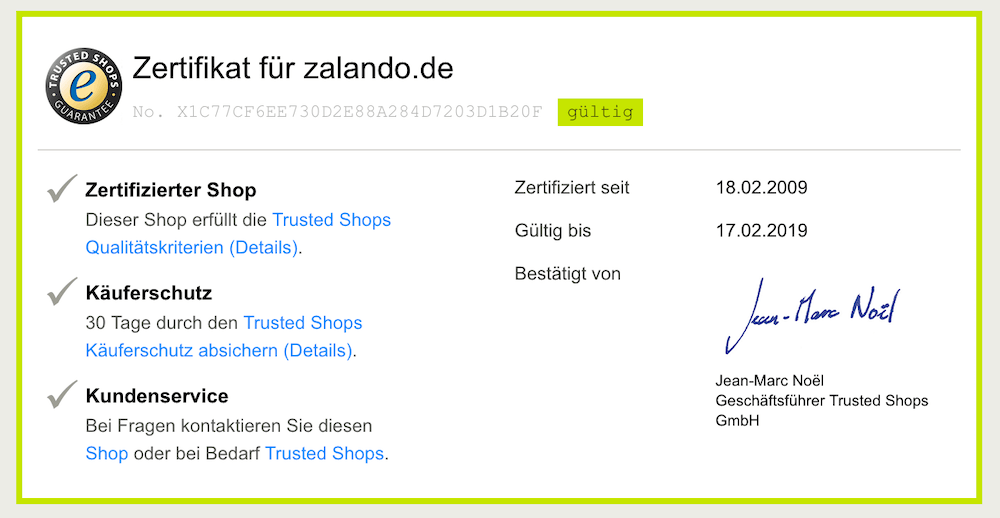
Dein Webshop wird mehr Vertrauen erwecken, wenn dein Shop einige wichtige Zertifikate und Trust-Siegel hat. Einige solche Anbieter sind zb Trusted Shops. Der Anbieter wird dein Shop auf bestimmte Kriterien und Sicherheitsaspekte ausgiebig testen. Dafür muss aber dein Shop 1A sein um diesen Test bestehen zu können. Es empfiehlt es sich auch eine professionelle Hilfe zu holen (Freelancer oder Agentur) um eventuelle Fehler und Sicherheitslücken zu schließen.
Einige dieser Qualitätskriterien sind:
Identität und Erreichbarkeit
Datenschutz und Sicherheit
Produkte und Kosten
Lieferung und Zahlung
Bestellprozess
Widerruf
Trusted Shops Käuferschutz
Qualitätsindikatoren
Bewertungen
Erstattungen
Rückmeldungen
Trusted Shops Zertifikat für zalando.de Bildquelle: trustedshops.de
Verschiedene Traffic-Quellen nutzen
Um die Besucher für deinen Shop zu bekommen kannst du verschiedene Traffic-Quellen nutzen. Wenn du dein Shop erst aufgebaust hast und nocht nicht bekannt bist, dann empfiehlt es sich den kostenpflichtigen Traffic einzkaufen. Das heißt die Besucher mittels Google Adwords und Facebook Ads zu holen. Sobald dein Shop etwas an Sichtbarkeit bei Google & Co. gewinnt, steigt auch die Besucherzahl über den organischen Traffic. Welche Traffic Sources du noch nutzen kannst und was du bei der Shoperstellung noch beachten solltest, erfährst du in dieser Anleitung für Einsteiger im E-Commerce https://www.webshop-anbieter.de/onlineshop-erstellen/ . Aufbau einer Facebook Fan Page und eines Instagram Accounts lohnt sich auf jeden Fall, da es absolut kostenlos ist und du so einen Kundenstamm aufbauen kannst und durch verschiedene Aktionen und Sales auf dein Shop aufmerksam machen kannst.
Was man als Shopbetreiber noch wissen sollte?
Leider ist es heute so, dass ein Shop sehr sicher sein muss. So muss man neben einer Datenschutzbestimmung auch die AGBs anzeigen lassen. Die Kunden müssen wissen, was mit ihren Daten passiert und nur wenn sie sich wirklich sicher fühlen, wird es auch ein guter Shop sein. Es muss also alles stimmen und stimmig sein. Ein zu bunter Shop wird nicht gern besucht. Auch wenn die Artikel unsortiert sind, wird der Shop eher die Kunden abschrecken als anlocken.
Wer es möchte, sollte sich unbedingt beim Shopanbieter informieren, was alles in den Shop muss, damit er auch sicher ist. So sollte es dann aber gelingen, einen guten und gern besuchten Shop einzurichten. Der Anbieter selbst spielt dabei eigentlich keine tragende Rolle. Man kann den Shop frei nach dem eigenen Geschmack aufbauen.
Seit Jahren befindet sich der Ecommerce Markt in Europa auf einem Wachstumskurs. Um bis zu 15 Prozent in Europa ist er im letzten Jahr gestiegen und verzeichnet mittlerweile einen Umsatz von bis zu 600 Mrd. Euro.
Diese Entwicklungen verwundern nicht, den schließlich ist der Kauf von Waren und Produkte über das Internet für die Kunden einfach. Ohne Öffnungszeiten, ohne Zeitdruck und Stress und einen Zugriff auf eine große Angebotsvielfalt, machen den Kauf im Internet interessant. So verwundert es aber auch nicht, dass immer mehr Unternehmen in diesem Bereich Fuß fassen möchten. Doch das ist gar nicht so einfach. Denn die Zeiten in denen man einfach einen Onlineshop erstellte und die Umsätze laufen, sind vorbei.
Ohne eine Strategie kein Erfolg
Wer heute im E-Commerce Fuß fassen möchte, der braucht dafür eine umfassende Strategie. Dazu gehört zum Beispiel ein oder mehrere Produkte, die sich über das Internet verkaufen lassen. Grundsätzlich kann man alles über das Internet verkaufen, mittlerweile sogar frische Lebensmittel.
Doch je nachdem um was für Produkte es sich handelt, können die Umsätze noch mager ausfallen. Bleibt man nur bei den Lebensmitteln, so gibt es hier erste Angebote. Doch im Vergleich zu den Top-Angeboten die nachgefragt werden, dass sind vor allem Kleidung und Unterhaltungseletronik, ist die Nachfrage noch gering.
Auch muss man sich überlegen, wie man sich von der Masse der Händler im Internet abhebt. Umsätze wird man nur dann generieren, wenn man Besucher im Shop hat. Neben dem richtigen Produkt, gehört dazu auch das passende Marketing. Hier muss man sich überlegen, wie man im Internet auftreten möchte. Denn hier gibt es verschiedene Möglichkeiten. So zum Beispiel über einen Shop auf der eigenen Internetseite oder aber die Nutzung von Plattformen, wie zum Beispiel Ebay, Amazon oder Facebook.
Gerade die bekannten Handelsplattformen haben natürlich den großen Vorteil, dass man hier sich Werbung sparen kann. Auch ist das Auffinden der Produkte wesentlich leichter, da man auf diesen Portalen Kunden mit einer Kaufabsicht hat. Im Vergleich aber zum eigenen Shop, muss man dafür entsprichte Abstriche beim Umsatz machen. Den es fallen entsprechende Gebühren für die Nutzung an.
Auch sollte man beachten, dass Preisdruck auf solchen Portalen durchaus größer sein kann, als im eigenen Shop. Wobei man generell immer den Preis zu seinem Produkt, aber auch zu ähnlichen Produkten bei anderen Händlern im Blick haben sollte. Ist man nämlich zu teuer, wird man nur wenig erfolg haben.
Kundenservice ist nicht zu vernachlässigen
Wobei gerade bei den Preisen, man auch seinen Kundenservice berücksichtigen muss. Einfach ein Produkt in das Internet zu stellen, funktioniert nicht. Heute muss man seinen Kunden einen umfangreichen Kundenservice bieten. Der Kundenservice fängt hierbei zum Beispiel an der Erreichbarkeit bei Fragen und Problemen rund um die Produkte und zu Bestellungen an. Hier sollte man über eine vernünftige und möglichst für den Kunden einfach nutzbare Struktur verfügen.
Zum Kundenservice gehört aber auch eine Vielzahl an Möglichkeiten der Bezahlung und natürlich der Versand. Nicht wenige Kunden legen mittlerweile großen Wert darauf, dass der Versand nicht nur kostenfrei ist, sondern auch schnell erfolgt. Beides sollte man entsprechend in seinem Konzept zum E-Commerce berücksichtigen und natürlich bei den Preisen für die Produkte auch entsprechend berücksichtigen. Denn gerade der schnelle Versand, erfordert auch eine schnell funktionierende Buchhaltung und Versandabteilung.
Hinsichtlich der Bezahlung, so sollte man hier vor allem die zahlreichen Online-Bezahlmöglichkeiten in den Blick nehmen. Das Online bezahlen ist gerade dann sehr wichtig, wenn man auch schnell versenden möchte.
Technik muss einfach sein
Zum Abschluss widmen wir uns noch der Technik. Die Technik ist gerade dann von Bedeutung, wenn man einen eigenen Shop im Internet einrichtet. Natürlich sollte man bei einem Shop immer darauf achten, dass die Seite einfach zu bedienen ist. Dazu gehört eine übersichtliche Führung vom Menü, eine ausführliche Vorstellung der Produkte und natürlich die Ladezeiten.
Damit Kunden einen guten Eindruck von einem Produkt bekommen, wird eine Artikelbeschreibung häufig mit zahlreichen Bildern versehen. Hierbei sollte man aber immer die Dateigröße im Blick haben. Den hat man diese nicht, kann sich dieses schnell bei den Ladezeiten für den Shop negativ bemerkbar machen. Hier sollte man sein Shop und insbesondere vorhandene Unterseiten regelmäßig überprüfen und bearbeiten.
Wie man letztlich erkennen kann, ist es gar nicht so einfach im E-Commerce Fuß zu fassen. Gerade weil man eine Strategie und Konzept benötigt.
Wer heute etwas kauft, ob neue Schuhe oder ein Computerspiel, so erfolgt dieses meist über das Internet. Dieser Umstand hat mehrere Gründe, angefangen von der größeren Angebotsauswahl, den Einsparmöglichkeiten durch die Angebotsvielfalt, aber es ist auch bequemer als der Einkauf in einem Ladengeschäft. Schließlich kauft man beim E-Commerce mit wenigen Klicks vom heimischen Sofa aus.
Wer sich mit dem E-Commerce näher beschäftigt, insbesondere mit dessen Entwicklung, der wird hierbei zahlreiche Unterschiede feststellen können. Gerade wenn man zum Beispiel den Online Handel in Europa mit den USA vergleicht. Welche das im Detail sind, kann man nachfolgend erfahren.
Diese Unterschiede gibt es bei den Kunden
Wenn die Rede vom E-Commerce ist, also dem Handel über das Internet, so kann man die USA hier als das Mutterland bezeichnen. Dort wurden ersten Versuche entnommen und dort waren auch die Geburtsstunden von bekannten Plattformen, wie zum Beispiel Amazon und Ebay.
Wenngleich die Handelsplattformen gleich sind, gibt es doch Unterschiede zwischen den USA und Europa. Ein gutes Beispiel ist hierbei das Bezahlen der Waren. Während in den USA die Mehrheit der Kunden die Kartenzahlung mit einer Kreditkarte bevorzugt, auch andere Online Bezahlmöglichkeiten sind weit verbreitet und werden genutzt. In Europa sieht es da anders aus. In Deutschland greifen zum Beispiel noch viele Kunden gerne zur klassischen Überweisung oder Lastschrift. Wobei man generell feststellen kann, dass auch in Deutschland und in Europa sich das Bezahlverhalten hin zu den Online Bezahlmöglichkeiten verändert. Bezahlmethoden wie Nachnahme die es durchaus in Europa gibt, findet man in den USA nicht.
Weitere Unterschiede gibt es aber auch beim Kaufverhalten. Während in den USA auf den virtuellen Einkaufszettel auch mal Lebensmittel landen, ist das in Europa noch nicht der Fall. In Europa spielen vor allem Güter wie Unterhaltselektronik, Kosmetik und Kleidung eine große Rolle im E-Commerce. Die Kunden in den USA und in Europa unterscheiden sich aber auch bei der Häufigkeit vom Einkaufen im Internet. Während Kunden in den USA mehrmals wöchentlich über das Internet bestellen, sieht das in Europa anders aus. Hier kaufen lediglich 25 Prozent einmal in der Woche ein, 63 Prozent sogar nur einmal im Monat.
Unterschiedliche Marktentwicklungen
Grundsätzlich muss man noch anmerken, dass sich der Ecommerce-Markt in den USA und Europa unterschiedlich entwickelt. Während der Markt in den USA weitgehend gesättigt ist und man mit ersten Rückgängen rechnet, so zum Beispiel um 1.9 Prozent. Sieht es in Europa anders aus, hier befindet sich der Markt seit Jahren im Aufwind. Wobei die Entwicklungen in Europa unterschiedlich stark voran schreiten. Das hat einfach mit den unterschiedlichen wirtschaftlichen und gesellschaftlichen Entwicklungen in den EU-Ländern zu tun, die ungleicher ausfallen, als in den USA.
Generell hat man auf Europa gesehen einen durchschnittlichen Wachstum von 15 Prozent im Jahr, wobei gerade in Ost-Europa der Ecommerce-Markt noch wenig entwickelt ist. Gerade wenn man hier mit Ländern wie Deutschland oder England vergleicht. Der Umsatz im E-Commerce beträgt in Europa rund 600 Milliarden Euro und in den USA rund 430.000 Mio. Euro. Auch hier zeigt sich, dass die Unterschiede gewaltig sind. Was aber alleine dem Umstand geschuldet ist, dass Europa hinsichtlich der möglichen Kundenzahl einen größeren Markt zu bieten hat.
In unserem ersten Beitrag geht es um die Entwicklung von E-Commerce. Da die Zukunft sich immer mehr ins Internet verlagert, wird auch dem E-Commerce ein immer wichtigerer Standpunkt in unserer Gesellschaft zugeschrieben. Schon heute lässt sich ja im Internet mit den richtigen Methoden schon sehr viel Geld verdienen. Vor allem Experten wissen genau, an welchen Stellschrauben Sie drehen müssen, um das Internet für sich und Ihre Erträge arbeiten zu lassen. Hier kommt der E-Commerce ins Spiel.
Der Begriff des E-Commerce kommt aus dem Englischen und bedeutet soviel wie Handel im Internet. Vereinfacht kann man hier sagen, den Einkauf und Verkauf von Waren.
E-Commerce wird immer wichtiger für die Unternehmen!
Unsere Gesellschaft wird immer älter. Die Jungen Menschen kommen nach. Die heutige Generation ist mit dem Smartphone aufgewachsen. Für Sie sind Begriffe wie Online Shopping keine Neuheit mehr. Das einfachste für den modernen Verbraucher ist, auf die Webseite seines Lieblings-Händlers zu gehen und die Waren oder Dienstleistungen online zu bestellen. In der heutigen Zeit wird der Handel mit Waren im Internet für die Unternehmen essenziell wichtig. Dies liegt vor allem daran, dass der stationäre Handel, wie wir ihn von früher kennen, immer weiter ausstirbt. Aber wer will dem Verbraucher das Verdenken? Liegen doch die Vorteile vom E-Commerce auf der Hand:
– die Bequemlichkeit
Um die neue Jeans anzuprobieren, ist es heute nicht mehr nötig das Haus zu verlassen. Der Postbote klingelt an der Türe und man bekommt die Ware direkt zur Haustüre geliefert. So spart man sich nicht nur Zeit, sondern auch nerven. Kann man doch dem Trubel aus der Stadt absolut einfach aus dem Weg gehen.
– die Einfachheit
Sollte die Jeans dann nicht passen, bieten die meisten E-Commerce Händler einen Rund um Service an. Dieser reicht von einfachen Online-Chats bis hin zu ausführlichen Rücksendebeschreibungen. Bei Fragen kann direkt auf eine Telefonnummer zurückgegriffen werden und man hat sofort einen hilfsbereiten Mitarbeiter am Ohr.
– der Preis
E-Commerce punktet auch durch seine Wahnsinnig hohe Transparenz. Im Netz gibt es unzählige Preisvergleichswebseiten, die dem Verbraucher sofort das günstigste Angebot von hundert verschiedenen Verkäufern anzeigen können. In Zeiten von Käufermärkten ist dies für den Verkäufer teilweise ein großes Problem. Aus der Sicht des Verbrauchers aber ein nahezu unübertreffbares Qualitätskriterium.
Außerdem können sich Online-Händler hohe Kosten sparen, indem Sie weniger Personal anstellen müssen als vergleichbare stationäre Händler. Dies liegt vor allem an der Zentralisation des gesamten E-Commerce. Oft haben Händler nur noch eine Verwaltungszentrale, die für ein sehr großes Gebiet alleine zuständig ist.
All die Punkte tragen dazu bei, dass E-Commerce in Zukunft für die Unternehmen ein immer wichtigere Standpunkt wird. Wer nicht mit der Zeit geht, der stirbt. Händler und Dienstleister können die immer weiter fortschreitende Verknüpfung aber auch als Chance sehen, ihre Leistungen an einem größeren Markt anbieten zu können. So bleibt es letztlich eine große Umstellung und eine große Wandlung. Aber auch eine große Möglichkeit, neue Absatzmärkte zu sichern und das Unternehmen auf den Vormarsch zu bringen.
Die Vorteile für den Verbraucher sind ja oben bereits klar beschrieben und zusammenfassend absolut passend für jeden, der es gerne einfach und bequem hat.
Während man sich vor einigen Jahren noch die Kleidung in Geschäften besorgt hat und 2-3 Stunden für den Einkauf einplanen musste, kann dies nun mit wenigen Klicks im Internet erledigen.
Die fortschreitende Digitalisierung
Man hat es damals schon geahnt und heute ist es so normal wie Smartphone in der Hosentasche. Der Kauf und Verkauf von Waren und Dienstleistungen im Internet hat in den letzten Jahren stark zugelegt. Bekannte Plattformen wie Amazon, Ebay sind dabei die bekanntesten Beispiele. Der Handel im World-Wide-Web boomt. Und dies macht man sich zu Nutze.
Im Zuge der Digitalisierung hat sich einiges getan. Zahlreiche Warenhäuser bieten Ihren Kunden auf Ihrer Webseite die Möglichkeit an, Ihre Produkte liefern zu lassen und auch eine Vorschau auf das Produkt zu erhalten (z.B. bei Schuhen, Oberteilen, Jacken etc.). Dies gilt nicht nur für Warenhandel oder Fast-Food-Lieferanten, sondern auch für die Dienstleistungsbranche.
Bestellungen dauern meist nur wenige Stunden bis Tage, umso größer die Vorfreude!
Wie E-Commerce den Alltag erleichtert
Dies ist nur ein Beispiel von vielen im Bezug auf den digitalen Handel. Das gewünschte Produkt ist schnell gefunden, einfach bezahlt und nach wenigen Tagen bereits vor der Tür. So hat sich der digitale Handel durchgeschlagen und auf allen Ebenen des Handels etabliert. Sei es bei Produkten oder auch bei Dienstleistungen.
Für den Käufer ist es eine Erleichterung im Alltag. Auf dem Weg zur Schule, zur Arbeit oder nebenbei… ein Flugticket buchen, ein Spiel oder das Essen bestellen. Sei es aus den eigenen vier Wänden heraus, über das Smartphone oder auch das Notebook. Jede Person, die Zugriff auf das Internet besitzt, kann sofort mitmachen.
Der Markt rüstet sich
Dieses Potential wurde bereits früh von den großen Unternehmen erkannt und so hat man bereits zu Beginn dieser globalen Digitalisierung des Marktes sein Geschäft wettbewerbsfähig gemacht.
Wer sich an damalige Zeiten erinnert, merkt sofort, wie der Handel auf digitaler Ebene sich verbreitet hat und überall vorhanden ist. Warengeschäfte haben Ihren Onlinekatalog massiv ausgebaut, die Nähe zum Kunden deutlich verbessert, Reklamationen oder Rezensionen werden viel schneller bearbeitet und es werden regelmäßig Aktionen gestartet. Das sind nur einige Vorteile des so genannten ,,E-Commerce“, zu deutsch: digitaler Handel.
Jeder einzelne kann dabei profitieren
Jeder, der ein Produkt oder eine Dienstleistung anbieten kann, wird hier fündig. Seiten sind schnell (auch für günstiges Geld) erstellt, Werbung kann nahezu überall geschaltet werden und Kunden gibt es ohnehin genug. Wer sich hierbei geschickt anstellt und über das nötige Fachwissen besitzt, kann sich so schnell ein Business erstellen und diese entweder nebenbei als weitere Einnahmequelle neben dem Hauptberuf nutzen oder es als Haupteinnahmequelle nutzen und sich somit finanziell unabhängig machen. Bereits tausende Personen haben diese Möglichkeiten genutzt und damit ein ordentlichen Vermögen angeeignet.
Für die, die in dieses Business einsteigen möchten, gibt es zahlreiche Anleitungsvideos, Broschüren, Kurse usw. Hier gilt das Motto: Wer sucht, der findet.
Was damals noch Neuland war, ist heute standart; und dabei bleibt es nicht. Die globale Vernetzung und damit auch der digitale Handel schreitet pausenlos weiter voran und wird immer wichtiger. Sowohl der Handel als auch die Zahlungen werden immer mehr auf digitaler Ebene abgewickelt.
Die hier aufgeführten Beispiele sollen nur einen groben Einblick auf den digitalen Handel ermöglichen, denn dieses Themengebiet ist so Facettenreich, dass man es an einiges Beispielen nicht genug zum Ausdruck bringen kann. Was die Zukunft bringen wird weiß keiner so genau, aber eins steht fest: der digitale Handel wird alles mitbestimmen.

 Von 12. bis zum 13 März 2019 verwandelt sich das Münchner Messegelände wieder in das Zentrum von E-Commerce und der Internet-Professionals. Auf der E-Commerce Messe Internet World Expo werden die neusten Trends präsentiert, die aktuellsten Technologien vorgestellt, namhafte Aussteller stellen ihre neuesten Produkte oder Dienstleistungen vor und zahlreiche renommierte Experten geben in Vorträgen ihr Wissen weiter.
 Vom 09. bis 10. Oktober findet der Kongress für den digitalen Handel, INTERNET WORLD CONGRESS 2018 in Sheraton Arabellapark, München statt. Top-Experten halten Vorträge über sehr aktuelle Themen wie Plattform-Handel, Personalisierung, Versand-Prozess, Digitalstrategien von Marken und viele andere, präsentieren Neuerungen in der Welt von E-Commerce und machen Vorschläge, wie die Innovationen optimal eingesetzt werden können.